The SmallRig Field Monitor Mount Holder is designed for camera rigs that need a compact way to position a 5- or 7-inch monitor above a cage or handle.
This SmallRig Field Monitor Mount Holder review looks at its adjustable tilt and swivel, anti-twist details, connection options, and load limits to help you decide whether it suits your setup.
SmallRig Monitor Mount Review Summary
The quick verdict
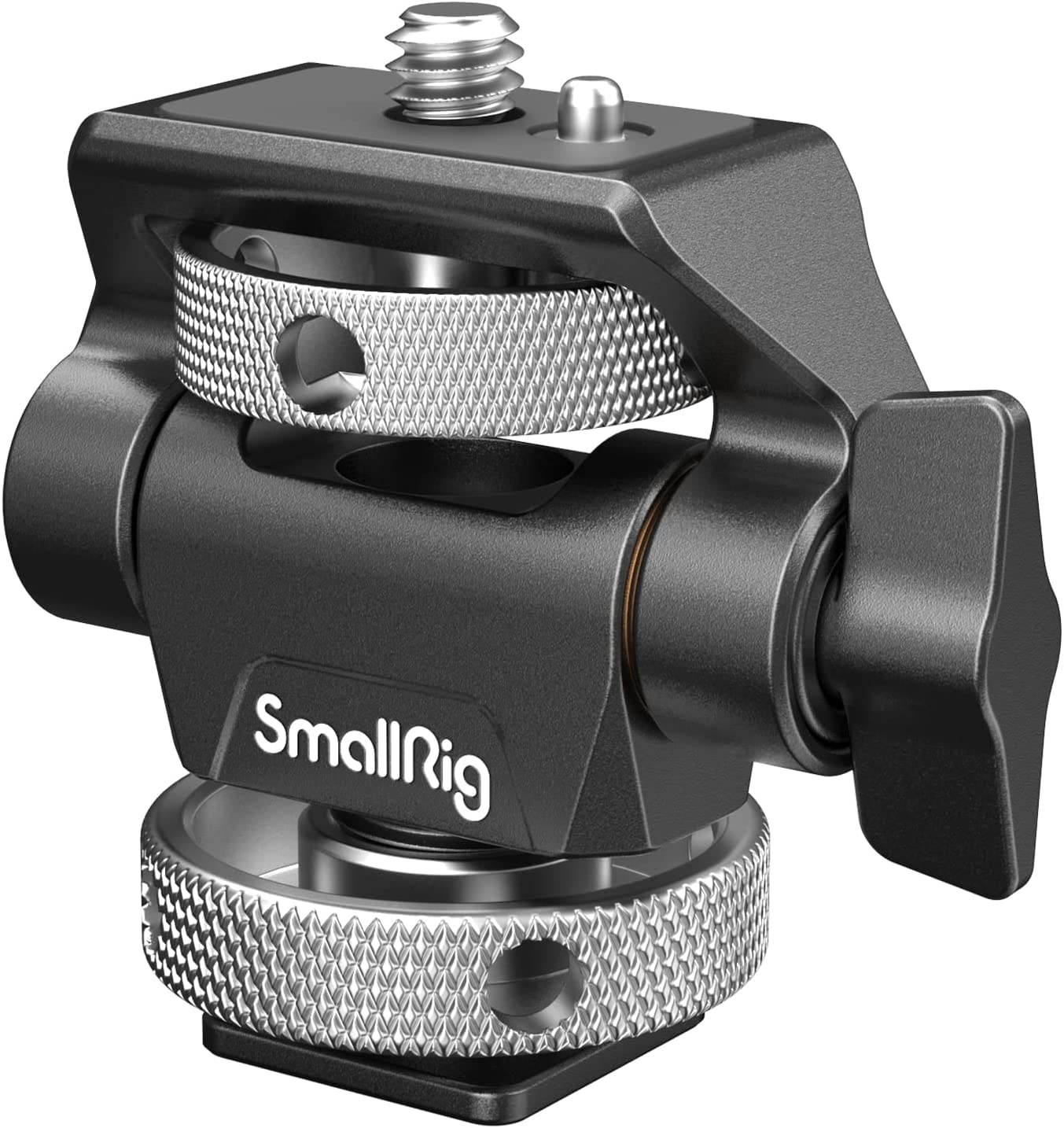
2,000+ ratings
Read Amazon ReviewsSmallRig Field Monitor Mount Holder
A compact, adjustable monitor holder for camera operators mounting a 5- or 7-inch display on a cage or handle.
- Designed to support 5- and 7-inch camera monitors attached by cold shoe to the top of a camera cage or handle.
- Offers up to 180 degrees of tilt and 360 degrees of swivel for monitor positioning.
- Tilt tension is adjusted with a thumbscrew; swivel tension is adjusted with the supplied Allen wrench.
- Built-in locating pins and a silicone pad are designed to help secure compatible monitors and reduce surface scratching and twisting.

Pros
- Broad tilt and swivel movement helps position a monitor for different camera angles.
- Thumbscrew tilt adjustment is convenient when changing viewing angle during setup.
Consider before buying
- Swivel tension adjustment requires the supplied Allen wrench, which is less immediate than the thumbscrew tilt adjustment.
- The permitted load changes with tilt angle, so buyers must check the limit for their intended position.
Read the full review summary
This mount combines a cold shoe base, a top 1/4-inch screw, and a threaded hole underneath for a magic arm or stabilizer.
Its 180-degree tilt and 360-degree swivel make it possible to adjust monitor placement around a camera, while the upgraded thumbscrew lets you change tilt tension without reaching for an Allen wrench.
The swivel tension still uses the supplied wrench, so adjustments are not entirely tool-free.
It is best suited to a compact rig where the monitor needs frequent repositioning and where the camera cage or handle already provides a cold shoe.
The locating pins and silicone pad are designed to help secure compatible monitors and protect their surfaces.
Capacity varies with tilt angle, so buyers should check both the monitor’s weight and intended position against the specified limits before mounting.
The buying factors
SmallRig Monitor Mount Scorecard
Editorial scores reflect listed features and buyer fit; they are not laboratory measurements or customer ratings.
Angle adjustment
The mount tilts up to 180 degrees and swivels 360 degrees, offering broad positioning options for a monitor on a compact rig.
Adjustment convenience
Tilt tension adjusts with a thumbscrew, while swivel tension requires the supplied Allen wrench.
Mounting flexibility
A cold shoe base and 1/4-inch-20 threaded hole support different attachment routes, subject to the rig’s available connections.
Monitor retention details
Locating pins and a silicone pad are included to help resist twisting and surface scratches.
Load guidance
The description gives angle-specific limits, but buyers need to match their monitor and chosen tilt to those values.
Compactness
At 76 grams with a folded size of 78 × 67 × 42 mm, it is a small addition to a camera rig.
Key Features and Specifications of SmallRig Monitor Mount
- Designed to support 5- and 7-inch camera monitors attached by cold shoe to the top of a camera cage or handle.
- Offers up to 180 degrees of tilt and 360 degrees of swivel for monitor positioning.
- Tilt tension is adjusted with a thumbscrew; swivel tension is adjusted with the supplied Allen wrench.
- Built-in locating pins and a silicone pad are designed to help secure compatible monitors and reduce surface scratching and twisting.
- The bottom cold shoe adapter connects to a cage or handle, while a bottom 1/4-inch-20 threaded hole accepts a magic arm or stabilizer.
- A top 1/4-inch-20 screw supports a monitor and can also attach accessories such as a microphone or light.
- The listed load limits vary by tilt: below 9.3 pounds at 90 degrees, below 5.5 pounds at 45 degrees, and below 5 pounds at 30 degrees. The mount weighs 76 grams.
Pros and Cons of SmallRig Monitor Mount
Pros
- Broad tilt and swivel movement helps position a monitor for different camera angles.
- Thumbscrew tilt adjustment is convenient when changing viewing angle during setup.
- Locating pins and a silicone pad add monitor-retention and surface-protection details.
- Cold shoe and 1/4-inch-20 connections provide more than one way to integrate the holder into a rig.
Consider before buying
- Swivel tension adjustment requires the supplied Allen wrench, which is less immediate than the thumbscrew tilt adjustment.
- The permitted load changes with tilt angle, so buyers must check the limit for their intended position.
- A cold shoe connection is useful only when the cage or handle has a compatible mount available.
Who Should Buy SmallRig Monitor Mount?
Good fit
Consider this holder if your camera cage or handle has a cold shoe and you want to position a 5- or 7-inch monitor with substantial tilt and swivel adjustment.
The tilt thumbscrew makes angle changes straightforward, and the locating pins and silicone pad address two common mounting concerns: monitor movement and surface contact.
Before choosing it, weigh your monitor and compare that weight with the limit for the angle you plan to use. If you expect to change swivel tension often, account for the Allen wrench adjustment.
For a rig that matches those conditions, this is a compact, purpose-built option with useful connection flexibility.
Who should skip it
Skip it if your monitor exceeds the load limit for your chosen tilt angle, or if your rig lacks a compatible cold shoe and you do not plan to use a suitable connection through the threaded hole.
Look elsewhere if you need a mount whose swivel tension can be adjusted by hand; this model uses an Allen wrench for that adjustment.
How the SmallRig Monitor Mount fits a camera rig
Angle range and framing
A full 180-degree tilt range and 360-degree swivel give operators room to orient the screen around the camera rather than relying on a fixed viewing direction.
That range can help adapt the display position to a particular shooting setup, but it does not remove the need to confirm clearance around handles, cables, and other rig components before use.
Tension controls and setup
The separate controls make a practical distinction: tilt tension can be changed with a thumbscrew, while swivel tension uses the supplied Allen wrench.
If you regularly reframe a monitor, consider which movement you adjust most and whether having the wrench available fits your workflow. The product also advises retightening the top knurled screw with the Allen wrench for added security.
Load limits depend on position
The listed maximums are not one universal capacity: the limit is below 9.3 pounds at a 90-degree tilt, below 5.5 pounds at 45 degrees, and below 5 pounds at 30 degrees.
Check the display’s weight and the angle you intend to use together. Avoid treating the highest figure as a general allowance across every position.
Connection choices and monitor contact
The cold shoe adapter at the bottom is aimed at cages and handles with a matching shoe, while a 1/4-inch-20 threaded hole there provides another connection for a magic arm or stabilizer.
The top screw accepts a monitor or other listed accessories. Locating pins and a silicone pad are intended to improve contact with compatible monitors; confirm that the pins and screw arrangement suit your display before relying on them.
Alternatives to SmallRig Monitor Mount
Camera Mounts & Clamps alternative
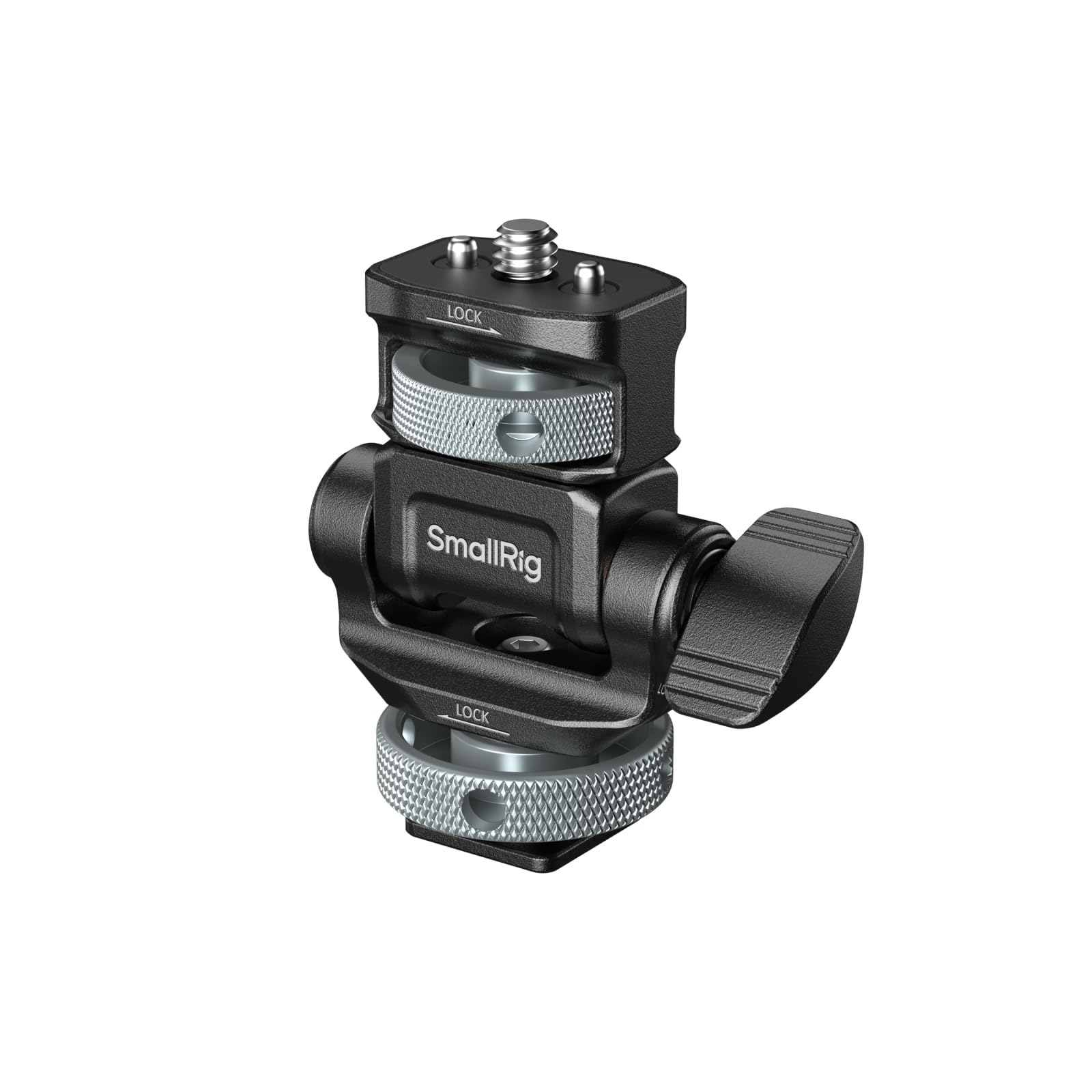
800+ ratings
Read Amazon ReviewsSmallRig Camera Monitor Mount 6313
Choose the Field Monitor Mount Holder if its stated monitor-size support and connection layout fit your rig.
Consider the 6313 if portrait as well as landscape installation is a priority or if you want thumb-adjustable tilt damping; check its mounting arrangement against your cage before deciding.
- The 6313 also offers 180-degree tilt and 360-degree pan, with thumb-adjustable tilt damping.
- Its description adds horizontal and vertical monitor installation and a retractable 1/4-inch-20 locating screw, along with locating pins and a silicone pad.
- The Field Monitor Mount Holder supports 5- and 7-inch monitors, tilts up to 180 degrees, swivels 360 degrees, and uses a bottom cold shoe or 1/4-inch-20 threaded hole.
Camera Mounts & Clamps alternative
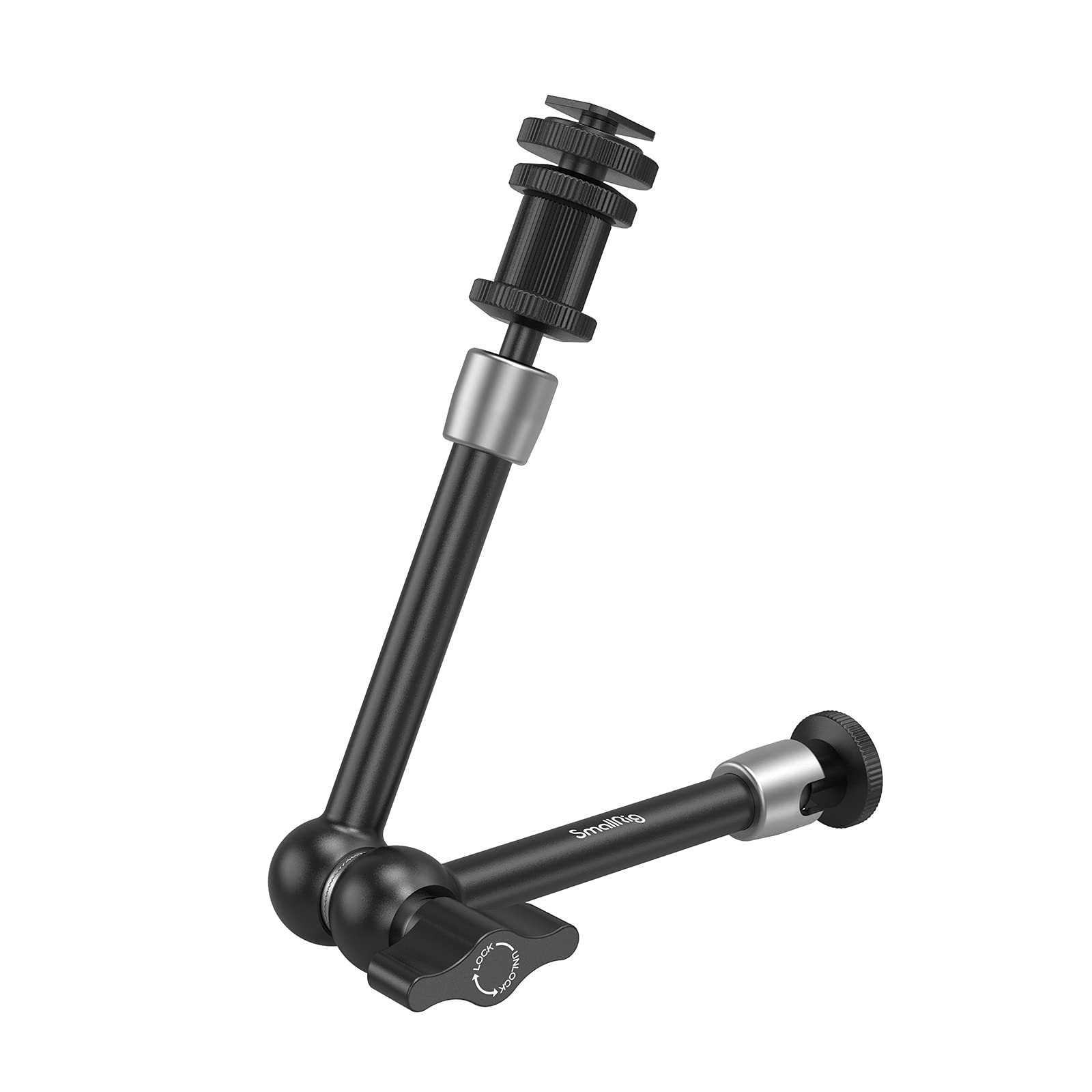
900+ ratings
Read Amazon ReviewsSmallRig Articulating Rosette Arm 1498
Choose the Field Monitor Mount Holder for a compact, direct monitor mount on a cold shoe or through its threaded hole.
Consider the longer 1498 when its 11-inch reach and mixed cold shoe/thread connections better fit your rig; confirm that its arm length and load guidance work for your setup.
- The Articulating Rosette Arm 1498 is an 11-inch articulating arm with a cold shoe at one end and a 1/4-inch thread at the other.
- Its description gives a maximum load capacity of 2.8 kg and a preferred load range of 1.5–2 kg.
- The Field Monitor Mount Holder is a compact holder for 5- and 7-inch monitors, with a cold shoe base, a threaded mounting hole, and angle-specific load limits.
Is SmallRig Monitor Mount Worth It?
The SmallRig Field Monitor Mount Holder is worth considering for a compact camera rig that needs a 5- or 7-inch monitor positioned with flexible tilt and swivel.
Its thumbscrew tilt adjustment, locating pins, silicone pad, and multiple connection options make it a focused mounting solution.
Check your monitor’s weight against the limit for the intended angle, confirm that your rig offers a suitable connection, and keep in mind that swivel tension needs the supplied Allen wrench.
If those tradeoffs fit your setup, it is a practical holder to shortlist.
Your review at a glance
2,000+ ratings
Read Amazon ReviewsSmallRig Field Monitor Mount Holder
A compact, adjustable monitor holder for camera operators mounting a 5- or 7-inch display on a cage or handle.
- Designed to support 5- and 7-inch camera monitors attached by cold shoe to the top of a camera cage or handle.
- Offers up to 180 degrees of tilt and 360 degrees of swivel for monitor positioning.
- Tilt tension is adjusted with a thumbscrew; swivel tension is adjusted with the supplied Allen wrench.
- Built-in locating pins and a silicone pad are designed to help secure compatible monitors and reduce surface scratching and twisting.